Skip to content

Clarity,
step by step.

From the first bid to the final walkthrough — here's the whole path.

The path, step by step

1 · Start your project

Create your renovation workspace: the room, the scope, the dates. Everything else — the milestones, the photos, the money, the record — hangs on it.

✓ free accountany trade

2 · Bring your contractors in

Invite each contractor to their part of the job. They see their scope; you see everything, in one timeline.

3 · Compare bids like a pro

Side-by-side scope and price reads before you sign — apples to apples, gaps surfaced.

4 · Follow it as it happens

Milestones, photos and written updates land as the work does — so "where are we?" is something you look at, not something you ask.

5 · Track the money

The contract, the change orders you signed, what you have paid and what is left — a clean total from deposit to final payment.

6 · Close out with confidence

A documented record of the whole job — photos, documents, reports — yours to keep.

Start my project← For homeowners
LIVE

The project page from your contractor

When the company doing your work runs on Supervisr, the job record it keeps for itself is a page you can read: the status, the start and estimated finish, the milestones, the money, your own materials, the updates and the photos.

It keeps itself current. Nobody has to write it up for you at nine at night, and nobody is working from a different version of the schedule.

The quality side of the job runs on your contractor's tools, not yours. What reaches your page is the work they have reviewed and posted — a professional record of your renovation rather than a raw camera roll.

A Supervisr milestone list for a hardwood remodel: demo and carpet removal, subfloor prep and raw wood install crossed off, with sanding, finish coats, trim and the final walkthrough still to come.
ONE PAGE · ALWAYS CURRENT

What you get

LIVE · FEATURED

Bid Comparison

Drop in the bids you have been sent and read them side by side: what each one actually includes, where the scopes differ, what one covers that another leaves out, and how the prices compare once you are looking at the same job.

Most bid confusion is not about price. It is about two documents describing different amounts of work in different words. This puts them in the same shape so you can decide on the merits.

LIVE

Be your own GC

One workspace for the whole renovation. Invite each contractor to their part of the job — they see their scope, you see everything, on one timeline. Nobody has to be cc'd on anything.

LIVE

Project financials, at total level

The contract, the change orders you signed, what you have paid and what is left — so "where does this stand?" has an answer you can look at instead of reconstruct.

Your contractor's costs, crew pay and margin are never part of your view. Not hidden behind a setting — simply not what you are shown.

ROLLING OUT

Messages and payments

One thread per job, so a question and its answer stay attached to the work they are about — and invoices arrive there and can be paid there, which is also how they end up on the record instead of in an inbox.

LIVE

Reports from your contractor

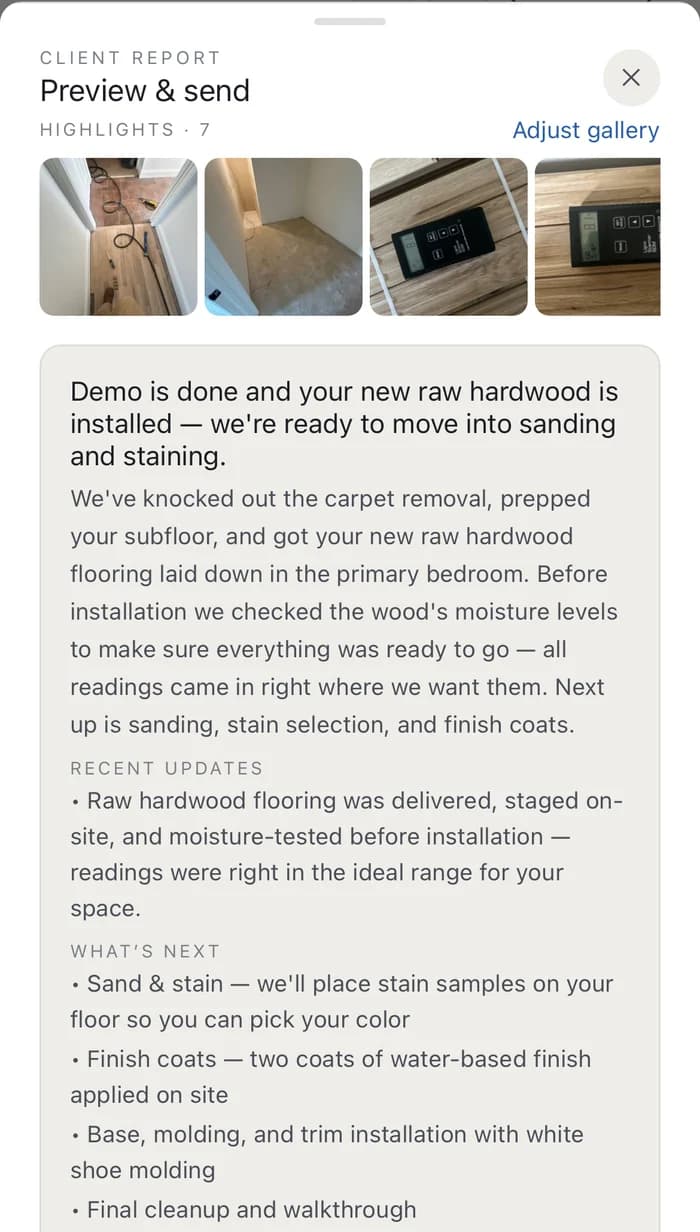
When your contractor runs on Supervisr, their progress reports land with you as the work happens — the receiving side of the same record, no chasing required.

A progress report received from a contractor: the week's photos, a plain-language summary of what was finished, what was checked before installation, and what happens next.
LIVE

A record you keep

Photos, documents and reports stay organized by project, so the closeout paperwork and the evidence behind it live in the same place a year from now.

COMING SOON

Bath Studio

See your new bathroom before you build it.

A Supervisr project's milestone list from the owner's side: three of seven complete at forty-three percent, with demo, carpet removal, subfloor prep and raw wood install ticked off, and sand, stain and finish coats still ahead.
YOUR PROJECT · AS IT MOVES

Everything in one timeline

Photos, documents, change orders, updates and answers sit in the order they happened, on the job they belong to. Four text threads and an inbox become one page you can scroll.

It stays with the house

What went in, who did it, and when — the thing that makes a warranty conversation straightforward two years from now instead of a memory contest.

A progress update received from a contractor on Supervisr: the week's photos, a plain-language summary of what was finished, and what happens next.

In a serious dispute? Get a licensed inspector.

An AI second opinion is informational. If money or legal action is on the line, a certified inspector's report is what counts — find one near you through ASHI or InterNACHI. We'll tell you when it's that serious.

ASHI — homeinspector.org · InterNACHI — nachi.org

Guides

Start your project

A homeowner account is free. Set the project up once, invite the companies working on your house, and read the job instead of chasing it.

Start my project

Sharing photos of work at your property? Read how photo consent and records work.

Supervisr is not a licensed home inspection service. Its AI analysis is informational only and is not a substitute for a professional inspection, engineering assessment, or code-compliance review. Supervisr can make mistakes — double-check responses, and use with caution.