Skip to content
FOR HOMEOWNERS · RUN IT LIKE A PRO

Manage your renovation
like a pro —
Peace of mind
included.

Innovation that powers your renovations.

The tools your contractor runs the job with, on your side of it: a live project page, updates and photos as the work happens, milestones, the money at total level, and one thread for messages and payments — plus a record of the work that stays with the house.

Start my projectFREE ACCOUNT · PRIVATE · YOURS TO KEEP
YOUR OWN ACCOUNT

No more fear of the unknown: run and manage your home renovation like an expert.

Supervisr gives you the tools to run your own remodel like a seasoned pro. Start a project of your own and watch it move — milestones as they tick over, updates as they land, and a time-lapse of the room built from the pictures you were taking anyway.

01 · WHILE THE WORK IS HAPPENING

Updates come to you.

Set up an extra device pointed at your renovation. While you’re away, Time-lapse mode captures the work in your house and tracks your milestones in real time — automatically.

Milestones move as the work does, so “where are we?” is something you look at rather than something you ask. Updates come to you as they happen — and you choose what you want to be told about.

The photos stitch in order into a short video of the room changing: the nicest way to see how far it has come, and yours to keep and to send to whoever you like.

✓ milestone updatesnotifications · your settingstime-lapse of the room
YOUR PROJECT · AS IT MOVESA Supervisr project's milestone list from the owner's side: three of seven complete at forty-three percent, with demo and carpet removal, subfloor prep and raw wood install ticked off, and sand and stain and finish coats still ahead.✓ 3 of 7 done · updated as photos land
IF YOUR CONTRACTOR RUNS ON SUPERVISR

The updates you were going to have to chase.

The job record the company doing your work keeps for itself is a live page you can read — kept current as the work happens, rather than written up for you at nine at night.

01 · THE WORK, AS IT HAPPENS

Photos and progress, posted for you.

The pictures your crew already takes turn into the update you would otherwise have had to ask for: what got done, what got covered up before the finish went on, and what happens next — written in plain language, with the photos attached.

Your contractor runs the quality side of the job on their own tools. What reaches your page is the work they have reviewed and chosen to post — a professional record of your renovation, not a stream of raw camera roll.

✓ posted by the people doing the workthe photos, dated and in order
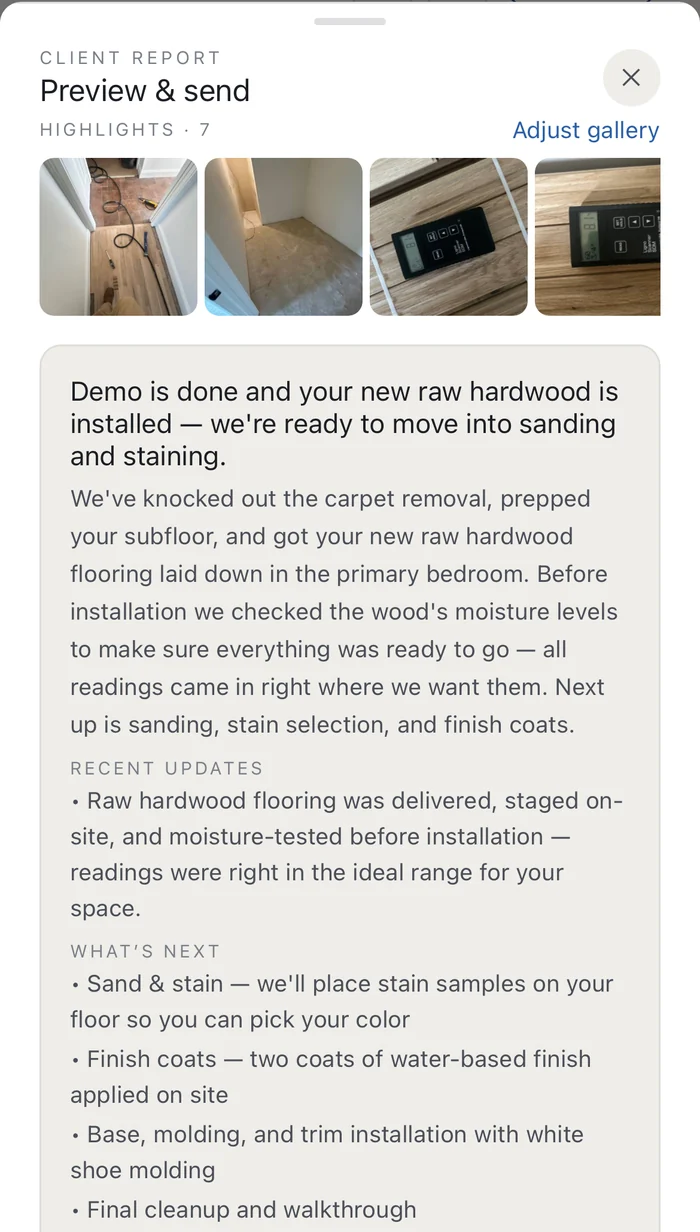
AN UPDATE · AS IT ARRIVESA progress update received from a contractor on Supervisr: the week's photos, a plain-language summary of what was finished, what was prepared before installation, and what happens next.what got done · what is next
THE MONEY · THE CONVERSATION

Where it stands, and what it stands at.

ONE THREAD · ONE LEDGERTOTALS, NOT GUESSWORK

The two questions that go unanswered longest.

“What have I paid, and what is left?” and “did anyone see my last message?” Both live on the project page instead of in a scroll-back through four months of texts.

The money reads in plain figures: the contract, the change orders you signed, what has been paid, and the balance — always current, never a surprise at the end.

Messages sit with the job they are about, so the answer to a question is attached to the thing it was about. Invoices arrive in the same thread and can be paid there, which is also how they end up on the record instead of in an inbox.

✓ contract · paid · balancechange orders you signedmessages + payments · rolling out

The money, in plain figures

What you owe and what you have paid, always current — with every change order you signed on the same page.

One thread, not four

Questions, answers and photos stay attached to the job, so nothing important is three months back in a text history.

Yours, privately

Your project is yours. Nothing is sent to anyone on your behalf — you decide what to share, with whom, and when.

GETTING GOING · THREE STEPS

Set it up once. Read it all year.

A homeowner account is free, and takes about as long to set up as a text message. From there the project keeps itself current.

THE METHOD · THREE STEPSONE PROJECT · EVERYONE ON IT
01 · START THE PROJECT

The room, the scope, the dates.

Name what is being done and when it is meant to happen. That is the spine everything else hangs on — the milestones, the photos, the money and the record.

02 · BRING THE COMPANIES IN

Each one to their own part.

Invite every company working on the house. They see their part; you see all of it, in order, with the photos and the paperwork attached.

03 · KEEP THE RECORD

It stays with the house.

Dated photos, documents, change orders and answers, kept in one place — the thing that makes a warranty conversation straightforward two years from now.

FREE ACCOUNT · NO CARD · ANY TRADE
YOUR WHOLE RENOVATION

One project. Everyone on it.

A renovation is rarely one company. Keep the photos, the documents and the people in a single place instead of four text threads and an inbox.

Be your own GC

Invite each company working on the house. Everyone sees their own part; you see all of it, in order, with the photos attached.

Compare bids side by side

Drop in the bids you have been given and read them as one table — scope against scope, so you can see what one includes and another quietly leaves out.

One record, kept for you

Dated photos, the questions you asked and the answers you got — the thing that makes a warranty conversation straightforward instead of a memory contest.

GUIDES · READ FIRST

What to look at, and what to let go.

Plain-English guides to the questions homeowners actually ask — written to shorten your list, not lengthen it.

In a serious dispute? Get a licensed inspector.

An AI second opinion is informational. If money or legal action is on the line, a certified inspector's report is what counts — find one near you through ASHI or InterNACHI. We'll tell you when it's that serious.

ASHI — homeinspector.org · InterNACHI — nachi.org

Sharing photos of work at your property? Read how photo consent and records work.

FREE · PRIVATE · NOT A LICENSED INSPECTION
Supervisr is not a licensed home inspection service. Its AI analysis is informational only and is not a substitute for a professional inspection, engineering assessment, or code-compliance review. Supervisr can make mistakes — double-check responses, and use with caution.