Contractor invoicing software that gets you paid from the job
Create the invoice from the job, send it with a PDF and a pay link, and let customers pay online by credit card or bank transfer. Checks, Zelle and cash land on the same job, so receivables and job margins stay current.
Contractor invoicing software creates the invoice from the job and collects the payment; Supervisr invoices go out with a PDF and a pay link, customers pay online by credit card or bank transfer through your own Stripe account, and checks, Zelle and cash are recorded on the same job.
| What it does | Invoices from the job with a PDF and a pay link; card and bank payments through your own Stripe account; checks, Zelle and cash recorded on the job |
|---|---|
| Who it’s for | Specialty and residential contractors and their crews |
| Price from | $99 a month (Solo). Unlimited crew seats on every plan |
| Trial | 10 days free. A card is taken at checkout |
Send it
- Invoices number themselves.
- Email the invoice with its PDF and a “View & pay invoice” link, from Supervisr or your own Gmail, or copy the invoice link into a text.
Get paid online
- Connect your own Stripe account and customers can pay by credit card or bank transfer (ACH). Payouts go to your bank through Stripe. Processing fees apply.
- Already use another payment link? Add it to the invoice.
Record everything else
- Checks and cash, recorded against the invoice.
- Photograph a check and Supervisr reads it and records the payment on the job.
- Show your Zelle details on the invoice if you take Zelle, and confirm the payment when your customer reports it.
See where the money is
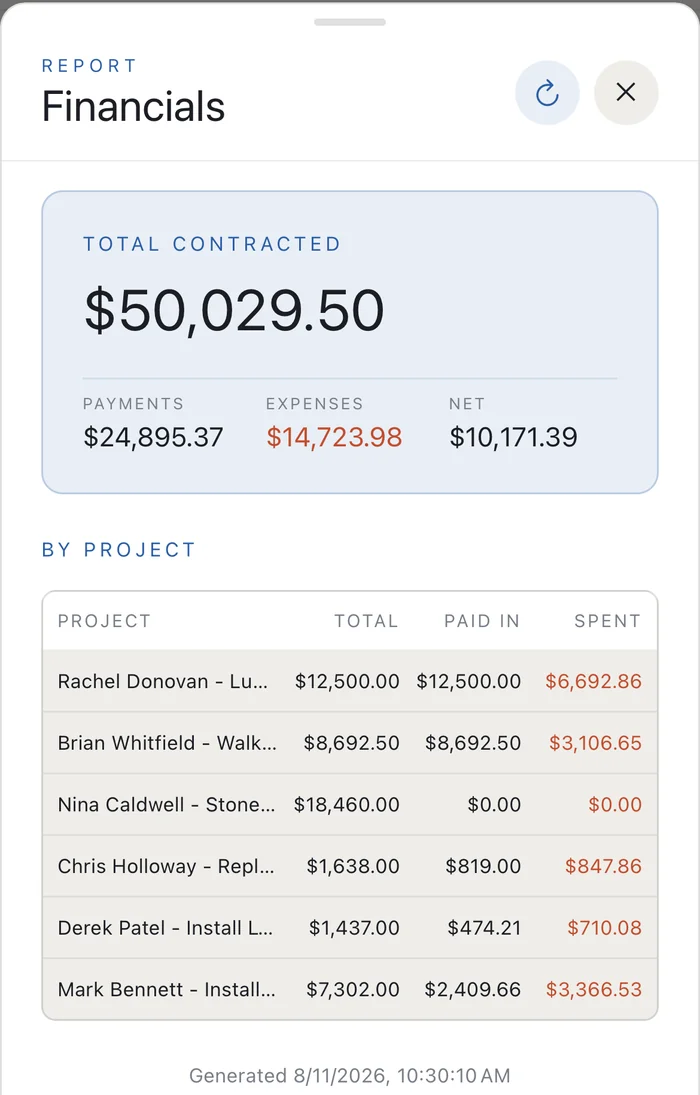
Receivables, payments and monthly financials update as payments come in, with job-by-job margins. Export to Excel or send the payments report to your bookkeeper.
Questions contractors ask
How do my customers pay?
Online by credit card or bank transfer from the pay link, or by check, Zelle or cash, which land on the same job.
Do I need a Stripe account?
To take card and bank payments online, yes. You connect your own Stripe account from Settings. Checks, Zelle and cash work without it.
Are there processing fees?
Card and bank payments run through Stripe, and processing fees apply.
Does it sync with QuickBooks?
Not today. You can export your financial reports to Excel or send the payments report to your bookkeeper.
Can I send invoices from my own email?
Yes. Connect Gmail and client email, including invoices, goes out from your own address.
How much does it cost?
Solo $99, Crew $199, Business $349 and Multi $599 a month. Every plan includes unlimited crew seats, and plans differ by monthly AI allotment. When you reach your limit, AI features pause until the next cycle. There are no overage bills. See plans →
More for contractors