Construction management software for specialty contractors
One system from the first walkthrough to the final payment. Bids, signatures, work orders, the crew schedule, invoices and job financials live on the same job, and AI checks your jobsite photos against your trade's standards.
Construction management software runs a contractor's jobs in one system, from the estimate to the final payment, and Supervisr is that system for specialty and residential contractors: bids and signatures, change orders, work orders, the crew schedule, invoices and job costing, with AI that checks jobsite photos against each trade's standards.
| What it does | Runs the whole job: price-book bids, e-signature, change orders, work orders, purchase orders, crew scheduling, invoicing with online payments and job financials, plus AI photo checks |
|---|---|
| Who it’s for | Specialty and residential contractors and their crews |
| Price from | $99 a month (Solo). Unlimited crew seats on every plan |
| Trial | 10 days free. A card is taken at checkout |
The whole job, in one place
- Lead and walkthrough. Keep leads and clients in the built-in CRM. Type or paste what you discussed at the walkthrough, or record it in the phone app, and Supervisr turns it into a consultation report you can build the bid from.
- Bid and signature. Price the bid from your own price book, offer options, and let the customer review and sign online or in person on your phone. More on contractor estimating software.
- Change orders. Priced from the same book and signed the same way.
- Work orders and purchase orders. Built from the signed bid. Your crew opens their work order from a link with no login, in English, Spanish or Portuguese. Purchase orders split materials from labor.
- Crew schedule. Every crew against every day on one board. Send each crew next week's schedule by text or email. More on crew scheduling software.
- Photos and AI checks. Crews send photos from their link or the app, which works offline. Once the job's scope (a contract, change order or work order) is on the project, Supervisr checks each jobsite photo against that trade's standards and flags what needs a decision. See how the photo check works.
- Invoice and get paid. Send invoices with a pay link. Customers pay online by credit card or bank transfer, and checks, Zelle and cash land on the same job. More on contractor invoicing software.
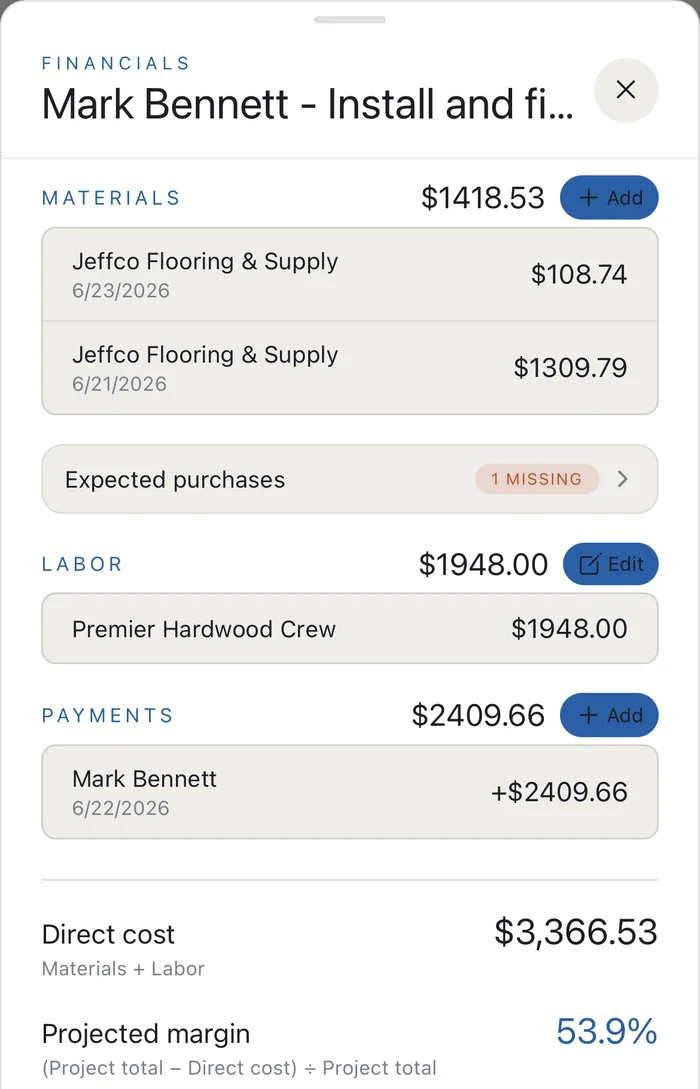
- Know your numbers. Monthly financials, job-by-job margins, receivables, crew pay totals and receipts, with your card statements matched against the receipts (CSV upload) and Excel exports for your bookkeeper.
Built for the trades
Supervisr is built for specialty and residential contractors (flooring, tile and bath, kitchens, roofing, siding, paint and drywall, carpentry, concrete and masonry, HVAC, plumbing, electrical and more) and the crews that do the work. Every plan includes unlimited crew seats. Plans don't lock features; they differ by monthly AI allotment.
Works with what you already use
- Google. Send bids and invoices from your own Gmail, back up job files to Google Drive, and put your production schedule on Google Calendar.
- CompanyCam. Bring your CompanyCam photos in, past and new.
- iPhone and Android apps, plus the web. Photos can be taken offline in the app and upload when you have signal.
What Supervisr doesn't do (yet)
If you need Gantt charts with task dependencies, a time clock, a QuickBooks sync or a customer login portal today, Supervisr isn't there yet. Reports export to Excel for your bookkeeper.
Questions contractors ask
What does construction management software do for a specialty contractor?
It keeps the whole job in one place: the bid and signature, change orders, work orders, the crew schedule, photos, invoices and the job's numbers, so nothing lives in a separate spreadsheet, text thread or paper folder.
How is Supervisr different from JobTread or Buildertrend?
All three run bids, schedules, invoices and job costing. Supervisr adds AI that checks your jobsite photos against trade standards, crew pay on every price book line, and a built-in marketing studio, with unlimited crew seats from $99 a month and a 10-day free trial. Supervisr vs JobTread → Supervisr vs Buildertrend →
Does Supervisr replace my accounting software?
No. It tracks job financials, receivables, crew pay and receipts, and exports reports to Excel for your bookkeeper. It does not sync with QuickBooks or Xero today.
How much does it cost?
Solo $99, Crew $199, Business $349 and Multi $599 a month. Every plan includes unlimited crew seats, and plans differ by monthly AI allotment. When you reach your limit, AI features pause until the next cycle. There are no overage bills. See plans →
Does my crew need to download an app?
No. Crew members can open their work orders from a link with no login, in English, Spanish or Portuguese. The iPhone and Android apps are there when they want them.
Is the AI photo check an inspection?
No. This is an AI reading a photograph. It is built to catch the recurring, visible misses that turn into callbacks, and to document the work that was done right. It is not a licensed inspection, an engineering assessment or a code-compliance review, and it cannot judge anything that is not visible in the frame. Treat a flag as a reason to look, not a verdict.
More for contractors