For contractors
Construction QA software
Quality control that runs on the photos your crew already takes — reading each one against the standards for that trade, flagging what needs your eyes, and filing the proof that the rest of it was done right.
The problem is not that nobody knows the standards
You know what a correct expansion gap looks like. Your lead knows. The issue is that neither of you can be standing in forty bathrooms at once, and the photos that would have told you sit in a group text until the homeowner calls. By then the tile is grouted, the crew is two towns over, and the fix costs you a day and a chunk of the margin.
Quality assurance in construction has always been a coverage problem, not a knowledge problem. Traditional QA software attacks it with checklists, which only works if somebody fills them in honestly at the end of a long day. Supervisr attacks it from the other side: the photo is the checklist. Once the job's scope is signed, each jobsite photo that gets uploaded is reviewed automatically, whether anyone remembered to review it or not.
How a photo actually gets graded
Each photo is matched to its trade and run through a model grounded in that trade's industry standards — tile through the tile model, roofing through roofing, drywall through drywall. Coverage is live across 16residential trades rather than one flagship category, because a remodeler's camera roll is never one trade deep.
The result comes back in two kinds, and the distinction is the whole design:
- Flags — something that needs a human decision. A missing expansion gap, lippage past tolerance, a flashing path that will not shed water. These route to a person.
- Notes — an observation worth recording that is not a defect. These file themselves into the job record and become the evidence that the work was right.
Most tools only ever produce the first kind, which is why crews learn to ignore them. A system that only ever tells you what is wrong is a system your foreman stops opening.
Tuned to your crew, not to a demo
A punch-list standard that makes sense on a high-end gut renovation will bury a production crew in noise on a rental turn. So the analysis is calibrated on several axes you control:
- A sensitivity setting you move yourself, so the flag threshold matches the work you actually sell.
- Project-type calibration — the same photo is judged differently on a custom build than on a turn, because it should be.
- Customer-supplied material awareness, so your crew never takes a flag for a tile the homeowner picked and delivered short.
- Field-Manager-aware routing — a flag goes to whoever actually owns that job, not to a company-wide inbox nobody is responsible for.
What the QA output turns into
A grade on a photo is only worth something if it moves through the business. The same analysis feeds the rest of the account:
- An open-flags queue per job, so a walkthrough starts from a list instead of a memory.
- Client reports built from checked work, shared from your own phone and your own number — nothing reaches your customer unless you send it.
- Closeout evidence that lives with the job forever, which is what you reach for the day a warranty claim shows up.
- Marketing drawn only from work the engine already checked, so nothing goes out that you would not want a prospect to inspect.
And because it all hangs off the photos, the back office fills itself in as a side-effect: schedules, work orders and POs, bids and e-sign, monthly financials, receipts. The full list is on the contractor features page.
What it looks like on a real job
A flooring company running 38 crews out of one office loaded its 312-line price book and its crew list in an afternoon. From then on every crew photo lands on the job it belongs to and is read on the way in. The owner is not opening a QA tool. The owner is getting a notice on the dashboard that names the job, the crew and the photo, and says what needs a decision — water damage and possible wood rot at the toilet flange, worth a call before the next step goes in — while the crew is still on site.
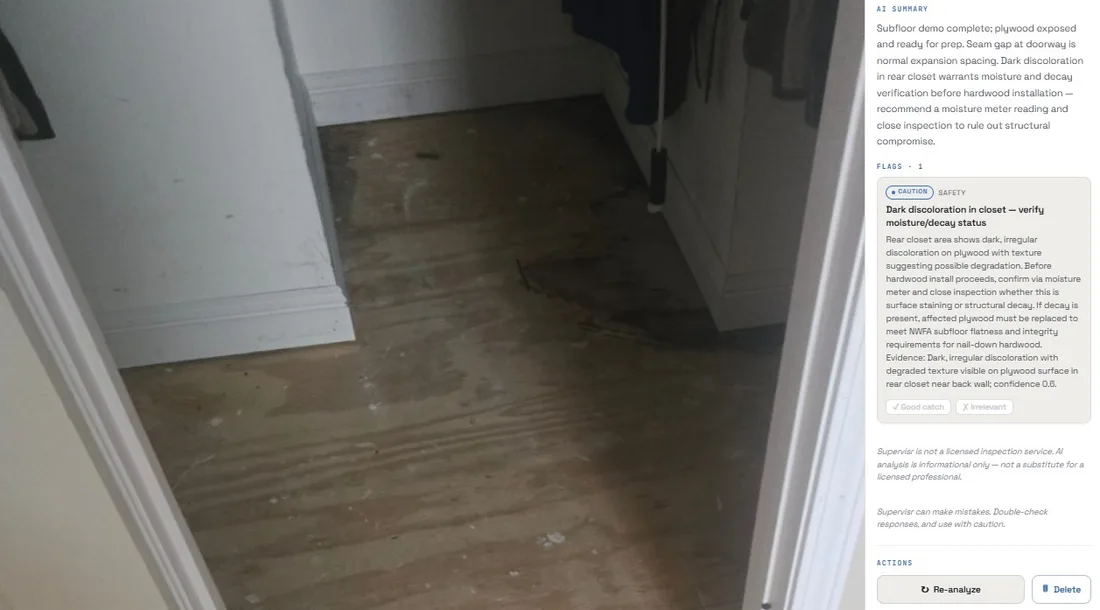
A second shop, more than a hundred projects since June, runs the same review on the photos it was already taking through CompanyCam. Nothing about the crew's habits changed. What changed is that a photo of a subfloor with a dark stain by the closet now comes back with a caution and a request for a moisture reading before the hardwood goes down, instead of sitting in a camera roll until the boards cup.
Neither owner reads the photos one by one. That is the point. Once a job's scope is signed, the review runs on its photos, a flag reaches the person who owns that job, and the notes file themselves as the evidence that the work was right.
Honest about what it is
This is an AI reviewing a photograph. It is very good at catching the recurring, costly, visible misses — the ones that generate callbacks — and it is not a licensed inspection, an engineering assessment, or a code-compliance review. It is there to protect your reputation by catching what a busy human missed, and to document your quality so you can prove it later. Treat a flag as a reason to look, not a verdict.
Questions contractors ask
What is construction QA software?
Software that checks the quality of the work while it is happening instead of at the end. Traditional QA is a checklist someone fills in; Supervisr's version reads each jobsite photo against the industry standards for that trade and returns two things — flags, which need a human decision, and notes, which record what was done right. It runs on the photos your crew already takes, so there is no extra step to skip.
Is QA the same as QC? What does construction QA/QC software actually do?
On a jobsite the two words get used together. QC is checking the work; QA is the system that makes sure the checking happens every time. Supervisr does both from one input: the photo is the check, and the automatic review of the job's photos, once its scope is signed, is the assurance that no job was skipped because it was Friday.
Does it replace a third-party inspection or a verification survey?
No. This is an AI reading a photograph. It is not a licensed inspection, an engineering assessment or a code-compliance review, and it cannot assess what is not visible in the frame. It catches the recurring, visible misses that turn into callbacks and documents the rest. Anything that needs a licensed professional still needs one.
Which trades does it cover?
Sixteen residential trades today, each read with that trade's industry specs as the reference — flooring and bath remodel are the deepest, and tile, hardwood, LVP, roofing, drywall, paint, HVAC, plumbing and electrical are all live. A remodeler's camera roll is never one trade deep, so the coverage is not either.
Does my crew have to learn new software?
No. Crew members send photos through their own link — no app to install, no login, no seat fee — and the photos land on the right job. If the crew already shoots in CompanyCam, connect it and the photos flow in on their own.
What does it cost?
Plans don't lock features; they differ by monthly AI allotment. Crew seats are unlimited and free. Plans start at $99 a month with a 10-day free trial, and the free tool gives you three analyses with no signup and no card.
Run it on a job you already finished
The fastest way to judge construction QA software is to point it at work you already know the answer to. Take three photos off your last job, run them through the free tool, and see whether it finds what you found. No signup, no card.
Try it on your own photos first.
3 free analyses. No signup, no card — see what it catches on your last job.
More for contractors